Transcribe YouTube Sermon to Text
Plenty of the best preaching lives on YouTube, but a video is hard to study. You cannot search it, skim it, or pull the verses out of it. Learning to transcribe a YouTube sermon to text turns an hour long video into something you can read, search, and revisit. This guide starts with the free option built into YouTube itself, is honest about where it runs out, and then walks through the path that gives you a transcript worth studying from.
Why turn a sermon video into text at all?
Video is great for watching once and hard for everything else. If a message helped you and you want to go back to a specific point, scrubbing through an hour of footage is painful. Text solves that. A transcript is searchable, skimmable, and quotable, and it lets you find the one paragraph that mattered in seconds.
It also lets you study a message you never had time to sit through. Read the transcript over lunch, pull the verses, and get the gist from a summary, all without giving up an hour to the video player.
How do I get a transcript of a YouTube sermon?
Before you install anything, know that YouTube has a transcript feature built in. On a computer, open the video, expand the description, and look for the Show transcript button. A panel opens beside the player with the text broken into short timestamped lines, and the menu in that panel can hide the timestamps. On a phone, tap the video's description to expand it and scroll down: the same Show transcript option appears when the video has one.
For quick jobs it is genuinely useful. It is free, it is instant, and every line is clickable, so tapping a sentence jumps the video to that moment. If all you need is to double check one quote or find where a passage was read, the built-in transcript may be enough.
Where YouTube's built-in transcript falls short
The catch is in how those transcripts are made. Unless the channel uploaded its own captions, which few churches do, the transcript is YouTube's automatic captioning, and it shows:
- Little or no punctuation and no paragraphs, so an hour of preaching arrives as one continuous ribbon of short lines.
- No speaker breaks, so the scripture reading, the prayer, and the preaching all run together.
- Biblical names and references suffer most, because automatic captioning is weakest on exactly the rare words a sermon leans on.
- Some videos have no transcript at all, because the channel turned captions off or the automatic pass never ran.
- Getting the text out is awkward. On a computer you can select and copy from the panel, but the timestamps and line breaks come with it. In the phone app there is no clean way to copy the transcript at all.
None of that makes the feature bad. It makes it a viewing aid, which is what it was built to be. It was not built to hand you a document.
What should a good sermon transcript include?
Turning speech into text is the baseline. A useful result reads like writing, with punctuation and paragraphs, and it treats the transcript as raw material for the things you actually wanted:
- A clean, readable transcript of the whole message.
- Every scripture reference detected and checked against a real Bible.
- A summary with the main points and takeaways.
- Cards you can share from the lines that stood out.
When you transcribe a YouTube sermon to text this way, you are not just reading the message. You are getting a study kit built from it.
From link to study kit
The smoother path is an app that takes the link and runs the whole chain: pull the audio, transcribe it properly, detect the verses, and summarize. You paste a URL and get back a finished set of study materials instead of a caption ribbon you still have to clean up and process by hand.
If what you have is a recording rather than a link, the sermon to text converter guide covers that job. And if you want to capture the service you attend each week, see the guide to an app that transcribes sermons from the pew.
Step by step
Copy the sermon video link
Open the sermon on YouTube and copy the video URL from the share button or the address bar.
Paste the link into the app
In Sunday Notes AI, choose to import from a link and paste the YouTube URL.
Let the app pull and transcribe the audio
The app extracts the audio and transcribes the full message into clean, punctuated text.
Read your transcript, verses, and summary
You get a searchable transcript, every detected verse, and an AI summary with key takeaways.
Paste the link, get the transcript
Sunday Notes AI imports a sermon straight from a YouTube link. Paste the URL and the app pulls the audio, transcribes the full message into clean, searchable text, and detects every verse the preacher referenced, looking each one up in a built-in KJV Bible. You do not have to be in the room, or even watch the video.
From that transcript you get an AI summary with key takeaways and shareable insight cards, the same as a message you recorded yourself. A sermon you found online becomes a transcript, a verse list, and a summary in a few minutes.
Get the app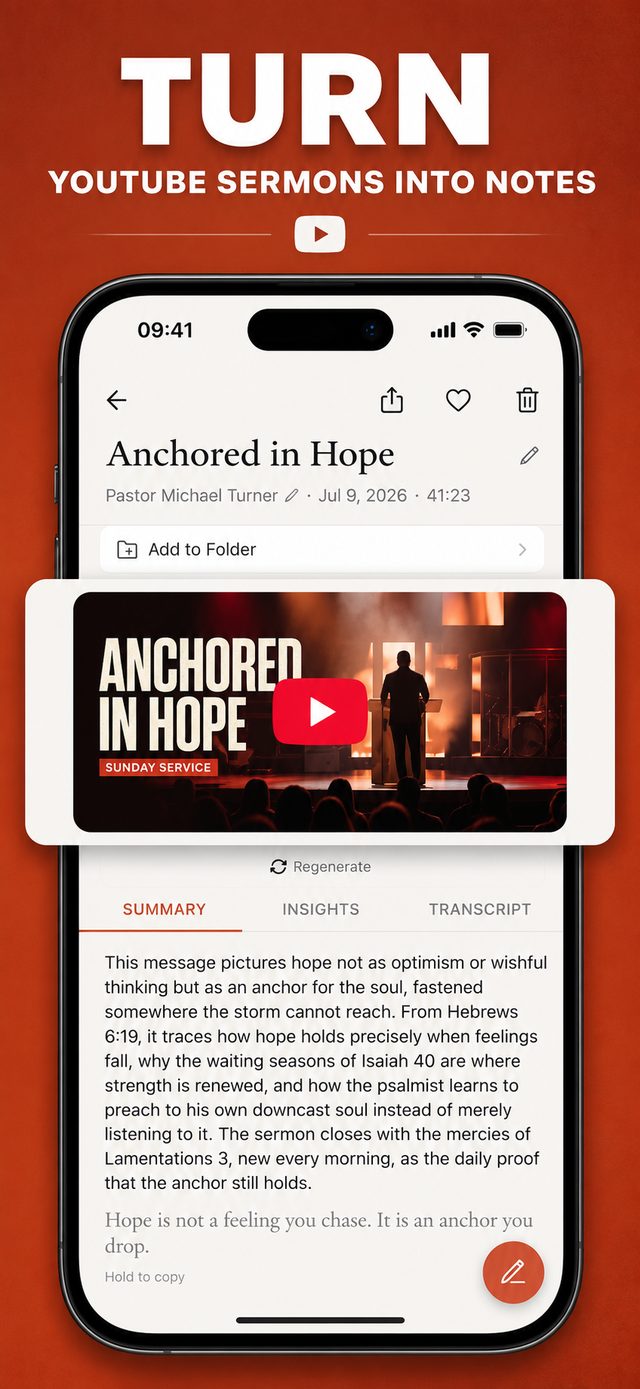
Common questions
Do YouTube auto-captions work for sermons?
They can give you rough text, but auto-captions usually arrive with little punctuation and are weak on the exact vocabulary sermons are full of, like book names and proper nouns. You end up correcting the parts you most wanted right.
Can I copy the transcript straight from YouTube?
On a computer, yes: open the transcript panel and select the text, though the timestamps and line breaks come along and take real time to clean out of a full sermon. The YouTube phone app has no good copy option, which is one reason people reach for an import tool instead.
How long does it take to transcribe a sermon video?
Most of the time is the length of the audio plus a short processing step. A typical message is ready to read in a few minutes after you paste the link.
Can I transcribe a sermon I did not record myself?
Yes. That is the point of importing from a link. If the message is online as a video, you can turn it into text, pull the verses, and get a summary without having been in the room.
Keep reading
More guides that go with this one: app that transcribes sermons, sermon to text converter, sermon summary generator. Or head back to the Sunday Notes AI home page to see how the whole app fits together.