The App That Transcribes Sermons for You
You are sitting in the service and the message is landing, which creates a familiar problem: write it down and miss what comes next, or stay present and watch the details fade by Tuesday. An app that transcribes sermons ends that trade. You press record when the preaching starts, set your phone down, and when the service ends the whole message comes back as text. This guide is about that in-the-pew use case: what recording from your seat is really like, what a phone can and cannot pick up in a sanctuary, and what a good app should hand you once the transcript exists.
Can a phone really transcribe a sermon from the pew?
Yes, and better than most people expect. The microphones in a modern phone are built to pick a voice out at a distance, and most sanctuaries help you: the preacher is on a sound system, so what reaches your seat is amplified and reasonably clear even from the back rows. You do not need a lapel mic on the pastor or a feed from the sound desk. A phone lying flat on your leg or on the seat beside you captures a usable recording of a normal Sunday service.
A few habits improve the result. Sit where you can hear comfortably yourself, because if the mix sounds muddy to your ears it is muddy to the microphone. Keep the phone out of your pocket and out of a bag, since fabric muffles a recording more than distance does. And leave it face down and still: taps, handling noise, and shuffling land loud on a recording because they happen inches from the mic.
How does recording from your seat actually work?
The whole point is that nothing happens during the sermon. You open the app when the preaching starts, press record, and put the phone down. The screen locks. You do not watch levels or check on it. For the next forty minutes the app's only job is to keep capturing, and yours is to listen.
That places two hard requirements on any app you choose. It has to keep recording with the screen locked for the length of a full service, and it has to hold the recording safely on your phone even when the building's signal is poor, which it often is inside brick and concrete. Transcription needs a connection, but not during the service: record offline, and the transcript is produced once you are back on WiFi or signal.
What should the app give you besides a transcript?
A forty minute sermon is six or seven thousand words. Nobody rereads that top to bottom, so a transcript on its own is an archive, not a tool. The apps worth installing treat the text as raw material and build on it:
- A searchable transcript, so "what did he say about forgiveness" is a two second search instead of a replay.
- Every scripture reference pulled out and looked up, because verses fly by faster than anyone can write them down.
- A short summary with the main takeaways, for the Wednesday when you want the heart of the message in a minute.
- Shareable cards from the lines that stood out, for the friend who needed exactly that sentence.
Judge an app that transcribes sermons by that list, not by whether it can produce a wall of words.
How accurate is transcription on scripture and names?
Sermon vocabulary is where general transcription goes wrong. Habakkuk, Thessalonians, Melchizedek, and quoted King James phrasing are rare words delivered in a reverberant room, and they are exactly the words you need correct. So ask two things of any app: does the speech engine hold up on long, live recordings, and does the app check the verse references it finds against an actual Bible? A reference either resolves to a real verse or it does not, and that check catches the errors a raw transcript would quietly keep.
Where does the recording go afterward?
A year of Sundays adds up to a personal record of your spiritual life, so it matters where it lives. Some tools store every recording and transcript in a cloud account on their servers. Others keep the archive on your phone and send audio out only for the transcription step itself. Neither is wrong, but they are different postures, and you should know which one you are signing up for before your library is fifty sermons deep.
One more thing before the app itself: this guide is for the person in the room. If what you have is a recording file or a message that lives online, that is a conversion job rather than a capture job, and the sermon to text converter guide covers it, including formats and what really determines accuracy. If the sermon is on YouTube specifically, see how to transcribe a YouTube sermon to text.
How Sunday Notes AI transcribes your sermons
Sunday Notes AI is built for the pew. Press record when the message starts, put your phone down, and be present. While it records, every scripture the pastor names appears as a tappable chip, and one tap opens the passage in the built-in KJV Bible without touching the recording. When the service ends, the app transcribes the full recording into searchable text, catches any reference the live pass missed, writes a summary with key takeaways, and turns standout lines into shareable cards.
Your sermons stay on your device. The only things that leave your phone are the audio sent out for transcription and the transcript sent for summarizing. The archive that builds up over months of Sundays is yours, on your phone, not in somebody's account.
Get the app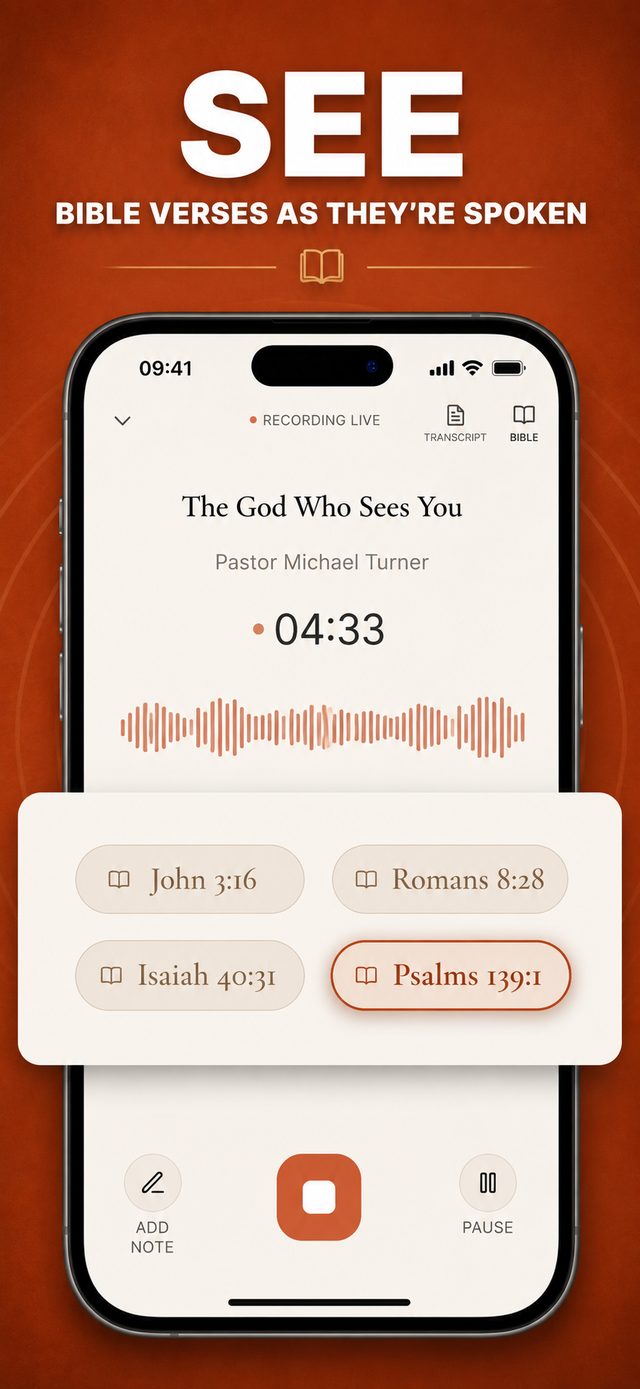
Common questions
How accurate is a sermon transcript recorded on a phone?
In a typical sanctuary with a sound system, accurate enough to use every week. Quality drops with distance, crowd noise, and muffling, so the biggest wins are simple: phone out of your pocket, lying still, in a seat where the mix sounds clear. The errors that remain cluster on names and references, which is why verse detection against a real Bible matters.
Will recording a whole service drain my battery?
Recording audio is one of the lighter jobs a phone does. The screen is what costs battery, and it stays locked the whole time. A phone that starts the service reasonably charged finishes a long message with plenty to spare.
Can it handle an hour long sermon?
It has to. Look for long-form recording that does not cut off mid-message, and timestamps in the transcript so any sentence can take you back to that exact moment in the audio.
Does a sermon transcription app work offline?
Recording works offline, which matters because sanctuaries are often dead zones. Transcription needs a connection, since the heavy speech processing happens on a server, so the transcript arrives once your phone is back on WiFi or signal.
Keep reading
More guides that go with this one: if you already have the audio in hand, start with the sermon to text converter guide; for messages you find online, transcribe a YouTube sermon to text; and for capture technique, the best way to record a sermon on iPhone. Or head back to the Sunday Notes AI home page to see how the whole app fits together.